

Reading mode
4.20
-

Kieli
English
-

OS
Android
-

Developer
Google LLC
-

#Versio
1.0.495053997
Sovelluksen kuvaus
Reading Mode: Enhance Your Screen Reading Experience
Introduction
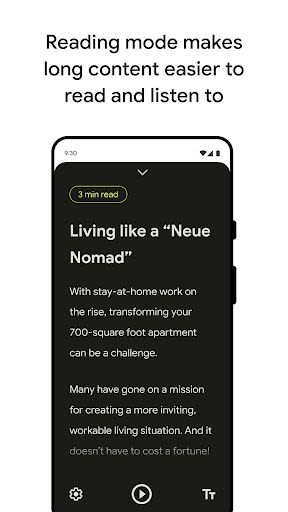
Welcome to Reading Mode, a user-friendly app designed to cater to individuals with low vision, blindness, and dyslexia. This innovative tool aims to elevate your screen reading experience by offering customizable features that include contrast settings, text size adjustments, text-to-speech capabilities, clutter reduction, and font type variations.
Instructions
To begin utilizing Reading Mode effectively, follow these simple steps:
- Download and install Reading Mode from the Play Store.
- Locate Reading Mode on your home screen and tap to open it.
- Review the tutorial for initial setup guidance leading to the settings page.
- Within the settings, enable the "Reading Mode" shortcut to seamlessly access the app.
- For further assistance, visit Google's support page to explore additional setup options.
Key Features
- Focused Reading View: Customize your reading environment by eliminating clutter for improved content accessibility and concentration.
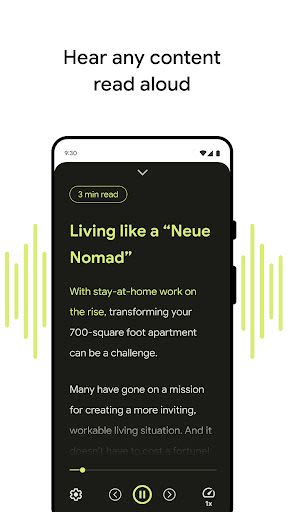
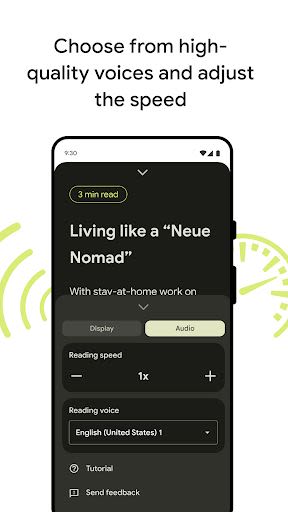
- Text-to-Speech: Enjoy the convenience of having written content read aloud with various high-quality voices. Control playback options effortlessly, including rewind, fast forward, and reading speed adjustments.
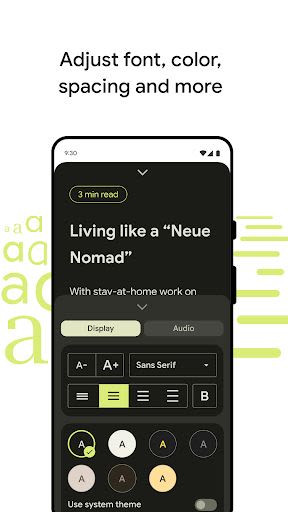
- Font Customization: Tailor your reading experience by selecting preferred font types, sizes, colors, and line spacing to suit your individual needs.
- Quick Access: Access Reading Mode seamlessly through your phone interface for swift navigation.
- Multi-Language Support: Currently available in English, French, Italian, and Spanish, with more languages in the pipeline.
- Talkback Compatibility: Seamlessly integrate Reading Mode with your screen reader for enhanced usability.
- Privacy-Focused Design: Rest assured that your content remains secure within the confines of your device.
Benefits
- Enhance screen reading for users with low vision, blindness, or dyslexia.
- Personalize your reading preferences for optimal comfort.
- Access content quickly and conveniently across apps and websites.
- Enjoy multilingual support for a diverse user base.
- Ensure seamless compatibility with Talkback and other screen readers.
- Prioritize privacy with a secure, on-device content handling approach.
Why Choose This App
Reading Mode stands out as a reliable solution for individuals seeking an enhanced screen reading experience tailored to their specific accessibility needs. With its user-centric design, customizable features, and privacy considerations, Reading Mode offers a seamless and personalized reading journey.
Compatibility
- Supported on Android 9 and later versions.
Permissions Notice
- Accessibility Service: As an accessibility service, Reading Mode may observe your actions and window content to optimize your reading experience.
Join the Google Groups forum to provide feedback and stay updated on product enhancements.
Experience the future of screen reading with Reading Mode. Download now and transform your reading experience!
Kuvakaappaukset
Videot
Similar

Windows 11
Microsoft

Wear Flashlight
CodVerter

Grok
xAI

Cleaner Antivirus VPN Cleaner
Cleaner + Antivirus + VPN company

owoTrack
Finoki

تەختەکلیلی کوردی | Kurdish Keyboard
Goran Gharib

Icon Torch - Flashlight
Aleksandr Balaev

Secure VPN
Dream limited

VPN Proxy Master - Secure VPN
Share File Technologies by 090 Bravo

Give VPN
Speed Group dev

Super Antivirus - Clean Virus
SUPER ANTIVIRUS

Fly Browser-Search & Private
Readerland