

Canon PRINT Business
3.70
-

Taal
English
-

OS
Android
-

Developer
Canon Inc.
-

#Versie
8.0.1
App-beschrijving
Canon PRINT Business: Your All-in-One Printing Companion
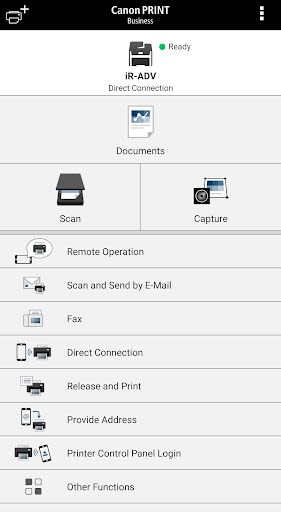
Canon PRINT Business is your ultimate solution for seamless printing, scanning, and document management on Canon laser multi-function devices or printers, all from the convenience of your Android device. Whether you need to print photos, documents, web pages, or manage scanned data, this free app has you covered.
Key Features:
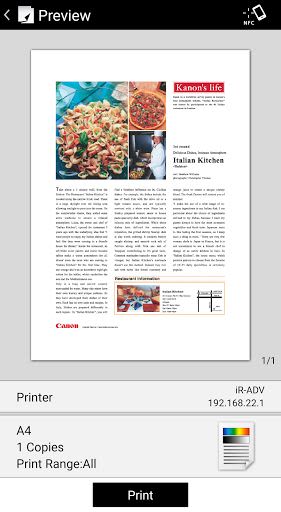
- Print scanned data, images, documents, and web pages.
- Read scanned data directly from a multi-function device.
- Capture images using your device's camera.
- Manage files stored locally or in the cloud effortlessly.
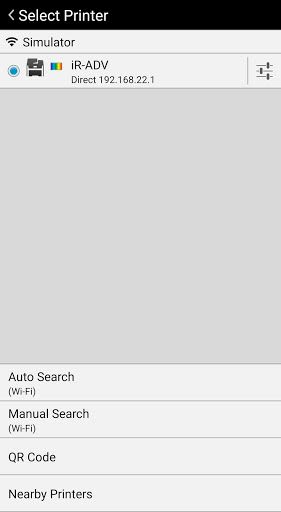
- Automatically detect printers on your network or manually search by IP address or DNS.
- Initiate direct Bluetooth connections with printers.
- Use NFC for auto-start and device registration.
- Utilize Remote Operation to control your device from your mobile terminal.
- Send faxes or scan and email documents directly from your Canon device.
Benefits:
- Conveniently print and scan on the go.
- Easily manage settings and print jobs.
- Effortlessly connect to multiple Canon devices.
- Access advanced device status information for better control.
- Enjoy seamless integration with various Canon printer models.
Why Choose Canon PRINT Business:
- Simplified setup with automatic device detection.
- Secure login and device registration via Bluetooth.
- Enhanced functionality with NFC support.
- Intuitive interface for easy navigation.
- Extensive compatibility with a wide range of Canon devices.
Supported Devices:
- imageRUNNER ADVANCE series
- Color imageRUNNER series
- imageRUNNER series
- Color imageCLASS series
- imageCLASS series
- i-SENSYS series
- imagePRESS series
- LBP series
- Satera series
- Laser Shot series
- Business Inkjet series
Compatibility:
- Some device models may not support Canon PRINT Business. Refer to the official Canon website for a list of supported devices.
- For PIXMA, MAXIFY, or SELPHY series printing, use Canon PRINT Inkjet/SELPHY.
- For scanning with imageFORMULA series devices, utilize CaptureOnTouch Mobile.
Technical Requirements:
- Android device connected to a wireless LAN access point.
- LAN or wireless LAN connection between your multi-function device and access point.
Print Function Settings:
- Output Method
- Department ID Management
- Output Size
- Copies
- Print Range
- Source
- Select Color
- 2-Sided Printing
- Staple
- 2 on 1 Printing
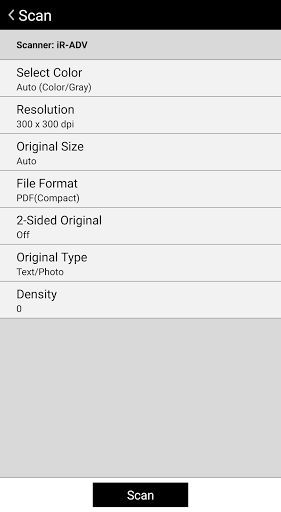
Scan Function Settings:
- Color/Select Color
- Resolution
- Original Size/Scan Size
- File Format
- 2-Sided Original
- Original Type
- Density
- Original Placement
Canon PRINT Business offers a comprehensive printing and scanning experience, tailored to meet your diverse needs. Take control of your Canon devices with ease and efficiency. Download the app today and streamline your printing tasks like never before!
Schermafbeeldingen
Similar

All Document Reader 2023
FunGear inc

QR Code Scanner for Android: QR Reader, QR Creator
Taymay - Simple & Effective.

ChatAI: AI Chatbot App
iKame Applications - Begamob Apps

App Lock - Applock Fingerprint
Trusted Tools

All Document Reader - One Read
Simple Design Ltd.

QR Scanner - Barcode Scanner
Leap Fitness Group

PDF Reader - PDF Viewer 2022
Simple Design Ltd.

FlyLadyPlus
FlyLadyPlus

BlackNote Notepad Notes
Notas Notepad

Free QR Code Reader & Barcode Scanner - QR Scanner
JonDev. Mobile

PDF Scanner APP - Scan to PDF
Simple Design Ltd.

Image to PDF Converter - JPG to PDF, PDF Maker
Simple Design Ltd.